
Unforgettable Car Trend Showing 42? Find the Cause and Get Your 24 Back
Why an Unforgettable car trend video shows 42 instead of 24 (a mirrored clip or the 4 card on the left), how to tell, and the fix for each.
 Unforgettable Car AI Team8 min read
The Unforgettable Car AI team: we watch the car-reveal videos we cover, date every play count we quote, and show the trend with clips made on our own generator.

TL;DR — Two mistakes turn the Unforgettable car trend's 24 into a 42: the clip was saved as a mirror image, or the 4 card was held on the left. Pause on the cards. If the digits face backwards, mirror the clip back in your editor; if they look normal, swap the cards and shoot the take again.
Or skip the filming, because Unforgettable Car AI's Unforgettable car trend maker keeps the 2 on the left, so every video it makes reads 24.
You post your car reveal, and the comments fill up with one number: 42.
We read 709 comments under 15 Unforgettable car trend videos on TikTok on October 14, 2026, and 23 of them pointed out a 42, with 2,423 likes between them. Under another car reveal on TikTok, "You did 42 nit 24" picked up 484 likes.
@supercarvicky's reveal got the same treatment: 18 of the 135 comments we read called out the 42. The top one, with 1,906 likes, reads "The video is flipped that's why it's 42". The frames of that clip tell a different story.
Here's what you'll get below:
- One paused frame: how to tell which of the two mistakes you have.
- A clip you've already filmed: the fix for it.
- Your next take: the fix on an iPhone, a Samsung Galaxy or a Google Pixel.
- No filming at all: a way to skip the camera.
New to the trend? Here's what the Unforgettable car trend means and where it came from.
Unforgettable car trend showing 42? Pause on the cards first
To find out why an Unforgettable car trend video shows 42, pause it where the cards are up. Then check two things: which way the digits face, and which way any writing in the shot reads.
| Pause on the cards and you see | Writing in the shot | Why it reads 42 | What to do |
|---|---|---|---|
| The 4 first, both digits backwards | Reads backwards | The clip was saved as a mirror image | Flip the clip in your editor |
| The 4 first, both digits normal | Reads normally | The 4 card was held on the left | Swap the cards and film again |
| The 2 first, both digits normal | Reads normally | Nothing, it's a 24 | Post it |
Checked on October 16, 2026 against a frame of our home page's sample, flipped and unflipped, and against @supercarvicky's reveal.
The right way round is 24 from the viewer's side, with the 2 on the left and the 4 on the right. Holding 4 and 2 sets up the exact 42 this article fixes.
Cause 1: the Unforgettable car trend clip was saved as a mirror image
A mirror image (the picture flipped left to right, like your reflection) turns an Unforgettable car trend 24 into 42. It swaps the two cards and turns both digits backwards.
While you film, the selfie screen (what the front camera shows you) works like a mirror. The file your phone keeps can look like that screen, or it can be flipped back the other way.
Apple's Final Cut Camera guide puts it plainly. What you record with the front camera either "matches the image you see in the viewfinder or is flipped horizontally".
It adds: "The effect is visible only during playback." So you won't spot the difference while you film, only when you watch the clip back.
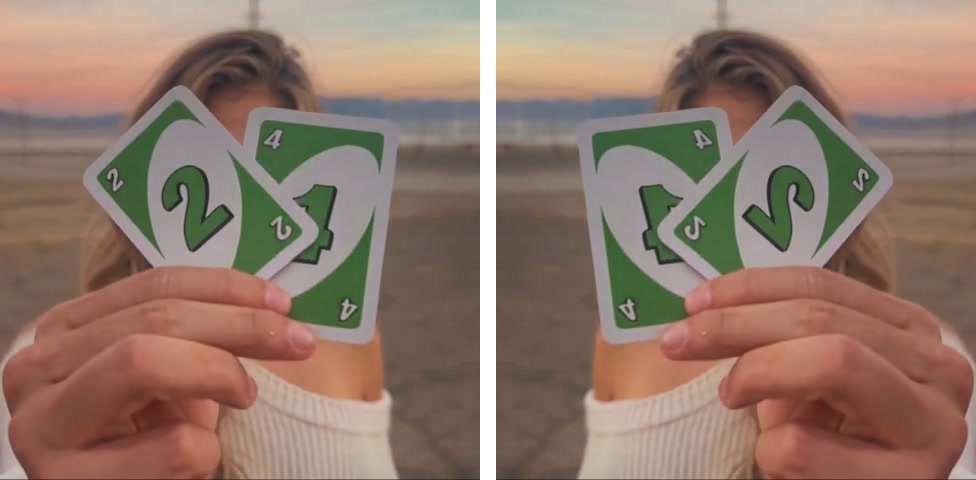
Left: our sample, reading 24; right: the same frame flipped, the 4 first and both digits backwards.
Flip the clip back in CapCut
Backwards digits are the easy case: a left-to-right flip sends the 2 back to the left and turns both digits the right way again. Here are the steps from CapCut's own flip guide:
- In the phone app: tap your clip on the timeline, then Transform in the bottom bar, then Mirror.
- On a computer: pick the clip in the timeline, then hit the Mirror symbol in the top bar.
Mirror turns the whole picture around, so save it for clips where the digits face backwards.
Cause 2: the 4 card was on the left in your Unforgettable car trend take
When the digits look normal but your Unforgettable car trend video still reads 42, the picture isn't flipped at all; the 4 card was simply held on the left.
The most-liked comment on @supercarvicky's reveal blamed a flip. The frames say otherwise.
The lettering on the T-shirt in the clip reads the right way round, so the picture isn't mirrored. And the two red-heart playing cards show the 4 on the left and the 2 on the right, with normal digits.
A commenter who got it right wrote: "Flipped the cards the wrong way it was 42 when it was supposed to be 24".
Swap the cards and film the take again
Flipping can't turn this take into a 24. The 2 would land on the left, but both digits would face backwards.
Start with the cards facing you, so you can read 24 yourself. Then turn the pair around toward the lens, like you're showing someone a sign. Now the lens reads 24, and you'll have the 2 on your right.
Your selfie screen will show them backwards, as 42. That's normal, so don't move the cards to make the screen look right.
Switch off the selfie mirror before your next Unforgettable car trend take
iPhone, Samsung Galaxy and Google Pixel phones each come with a switch for this: it decides if the front camera keeps the mirrored picture you see on screen.
- iPhone: open Settings > Camera and switch Mirror Front Camera off. Apple's guide says that when the switch is on, you get a selfie that captures "the shot as you see it in the front-facing camera frame, rather than reversing it".
- Samsung Galaxy: in the Camera app, tap the Settings icon in the top left corner of the screen. Then switch off Save selfies as previewed under Selfies, so your phone stops saving selfies "as they appear in the preview without flipping them."
- Google Pixel: open the camera and tap the Down arrow at the top, then Settings. Find Save selfie as previewed there, and switch it off.
Once the switch is off, shoot a two-second test and watch it back before the real take. Watching it back is how you see what the phone kept.
AI-made Unforgettable car trend videos get the same check
An Unforgettable car trend video from an AI template can show 42 too, and pausing on the cards works on it the same way. A backwards one gets flipped like any clip; one with normal digits in the 4-2 order has to be made again with cards that read 24.
Even AI prompts spell out the order. Media.io's prompt for the trend asks for this: "Show exactly two cards: 2 and 4, reading 24 from the viewer's left to right. Do not mirror or change the numbers."
The maker on our home page needs no prompt at all. We lined up the apps that make the Unforgettable car trend side by side.
Get an Unforgettable car trend video that reads 24 every time
Unforgettable Car AI's Unforgettable Car Trend reveal from your photo builds the green 2 and 4 cards, the swipe and the car into the trend's clip. The 2 sits on the left and the 4 on the right, so every video reads 24.
We paused the card frame at 2.85 seconds in our sample and in a second video made with the same effect. Both show the 2 on the left, with the digits facing the right way.
- Your photos: you add one selfie. An optional car photo under More options puts your car behind you instead of the default dark-blue sports car, for no extra credits.
- Your video: an 11-second MP4 in 16:9, carrying the trend's "Unforgettable" sound, with no watermark on it.
- Price: one 720p video is $9.90, which is one 500-credit pack, while 480p takes 375 credits and 1080p takes 1,480. Packs are one-time payments, there's no subscription, and if a video fails, its credits go back to your balance automatically.
- No account: you don't need one. The button reads "Create · $9.90" right in your web browser, next to the line "No account needed: pay once and your video starts right here."
Our guide shows how to do the Unforgettable car trend without a car, step by step, with nothing to cut or sync.
Fix the 42, then post your 24
Flipped footage just needs a quick flip in your editor, while swapped cards call for a fresh take with the 2 leading on the left. If you'd rather not film it, our browser-based Unforgettable car trend generator builds the reveal with the digits facing forward every time.
By the Unforgettable Car AI Team. We counted the 42 comments on October 14, 2026. On October 16, 2026, we paused the frames, followed the phone and CapCut guides and checked our own prices and labels.
Related articles
- Unforgettable Car Trend Without a Car: Make Yours From One Selfie — the two steps, the car you get and what one video costs.
- Unforgettable Car Trend Meaning: Why People Hold Up a 2 and a 4 — what the green 2 and 4 stand for, which song plays and who posted it first.
- Unforgettable Car Trend App Guide: 8 Tools in 3 Groups (2026) — the apps people use for the reveal, side by side.


